BESS remote monitoring should help a business understand operation, review records and ask questions that can be followed up, not simply display charts. Before ordering, confirm the data available from the quoted equipment, access permissions and the conditions for connectivity, retention and export. A dashboard demonstration alone does not establish that every function is included.
This guide starts with an operating-project interface supplied by Solaura, then examines data, time periods, permissions and connectivity through a monitoring worksheet. Solaura has confirmed the data source and approved public use of the screenshot. It is not presented as an independent audit or a performance guarantee for other projects.
Table of Contents
What the Solaura Control Interface Brings Together
The interface brings storage and PV capacity, charge and discharge energy, grid purchases, PV generation and operating statistics into one overview. For a business reviewing a solar-plus-storage installation, this consolidated view makes the main information categories easier to inspect without relying only on separate screenshots. Available fields still depend on connected equipment and project configuration.
Revenue statistics, time-of-use tariff information and year, month, day and hour selectors are also visible. Their value is in bringing operational and reporting information together, not independently proving savings. Confirm which views support each interval, how long records are retained and whether they can be exported.
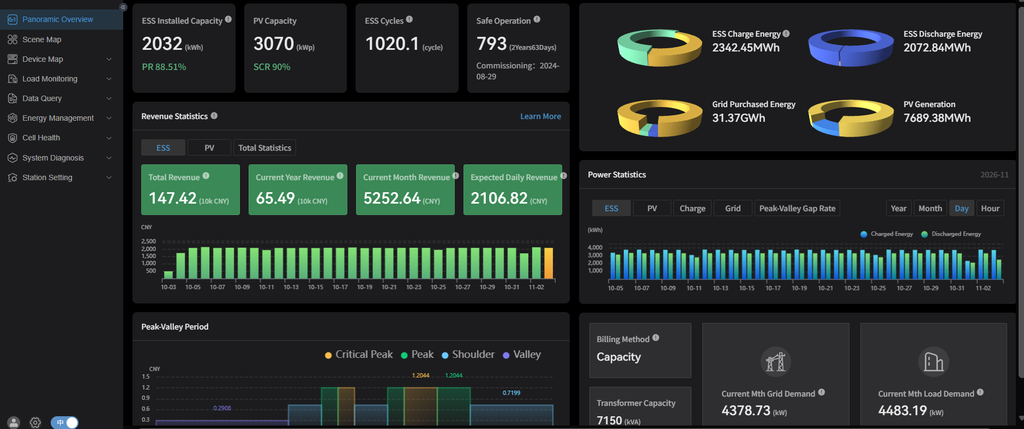
Control-system interface supplied by Solaura, displaying data collected from an operating project. Figures and revenue statistics relate to the project and reporting conditions shown, not guaranteed results for other installations.
The revenue shown in CNY is not a financial case for a Nigerian installation. The Safe Operation field is not independent safety evidence. Nor should cumulative charge and discharge figures be divided to claim round-trip efficiency without matching measurement boundaries and periods. Cell Health and System Diagnosis are visible menu entries, not proof of specific predictive or diagnostic capabilities.
Start With the Question the Data Must Answer
A business may need to know whether the battery discharged during an interval, when grid purchases increased or what happened around an event. Connecting a question to fields and time periods is more useful than asking whether an app exists. Do not assume every system exposes cell-level data or that readings from separate devices are perfectly synchronised.
A BESS remote monitoring demonstration should use data with an identifiable source and time reference. Ask to review a historical interval and explain gaps, interrupted records or aggregated values. A changing number alone does not establish the accuracy of the complete data path.
Separate the Current Display From Usable History
Check the time zone, last update, logging interval and reporting period. A daily total may support day-to-day comparisons without explaining a brief event. Let the operational question determine the required detail rather than prescribing the same second-by-second sampling for every project.
Distinguish collection at the site, transmission to the platform and refresh of the screen. A faster display does not necessarily mean more detailed device records. Stating the fields, time range and intended use helps prevent a visual demonstration from being mistaken for a logging specification.
Review an Export Sample Before Ordering
If export is a purchase requirement, request a sample and check timestamps, units, device identifiers, fields and treatment of missing values. A chart screenshot can help communication but is not a replacement for records suitable for later analysis. Do not assume every displayed field is exportable.
The Victron VRM data logging guide describes local records and offline analysis for the equipment it covers. It illustrates why the device, storage medium and software conditions matter. It is not a claim that Solaura provides the same method.
Clarify Access in BESS Remote Monitoring
Confirm viewing, exporting and changing settings separately. A manager may need read access while selected technical personnel require control functions. This article addresses the scope of access, not instructions for changing electrical settings, starting equipment or updating it remotely.
The Victron VRM access guide distinguishes user, technician and administrator roles. Different accounts on the same platform can therefore have different capabilities. Buyers should review the account access to be delivered rather than relying only on a supplier administrator demonstration.
Ask What Changes When the Connection Is Lost
An offline indication does not by itself prove that the battery has stopped operating. Equally, it does not justify a promise that every function continues normally without connectivity. Check local operation, logging, cloud display, alarm delivery and remote actions separately for the actual system.
Ask how long records can be held, whether storage limits apply, how backlogs are uploaded and which notifications depend on connectivity. Do not disconnect communications at a working site as an informal test. Verification should be carried out by suitable personnel under an approved plan.
Put the Monitoring Requirements in One Worksheet
Use the worksheet below for BESS remote monitoring discussions. Record demonstrated functions, documented capabilities and open questions separately. Clarify platform, gateway, connectivity and subscription costs rather than assuming everything is free or permanently included.
| Review item | What to confirm |
| Data | Fields, units, source devices and timestamps |
| History | Logging interval, retention and explanation of gaps |
| Export | Sample, format, available fields and account requirements |
| Permissions | Delivered viewing, export and control access |
| Connectivity | Gateway, connection and function-specific outage behaviour |
| Costs | Hardware, communication, subscriptions and renewal terms |
| Evidence | Model, version, demonstration and open questions |
Use the BESS procurement documents guide for the wider project information. Link the monitoring worksheet to the equipment and quotation revision instead of treating a platform brochure as the delivered specification for every configuration.
Buyer Questions
Does Mobile Viewing Include Control Access?
No. The viewing method and control permissions are different questions. Check the account role, configuration and supported scope.
Does a Cell Health Menu Prove Predictive Diagnostics?
Not from the menu alone. Request the function description, data inputs, meaning of its outputs and limitations. A navigation label is not performance verification.
Key Takeaway
The value of BESS remote monitoring lies in understandable, traceable information that supports operational decisions. A consolidated interface is a useful starting point, but procurement still needs confirmed data, history, access, connectivity and cost conditions rather than a comparison of screens alone.
When discussing battery energy storage systems with Solaura, provide the location, equipment scope, required monitoring fields, historical records and access needs. Functions, platform and service scope remain subject to the confirmed proposal and quotation.
Found this helpful? Share it with your network.
👇